Rob Run ESP Cheat Setup: Build a Layout You Can Read
Build a readable Rob Run ESP layout in layers: one shape, then identity, then status and direction, with a stress test in a crowd before you save the config.
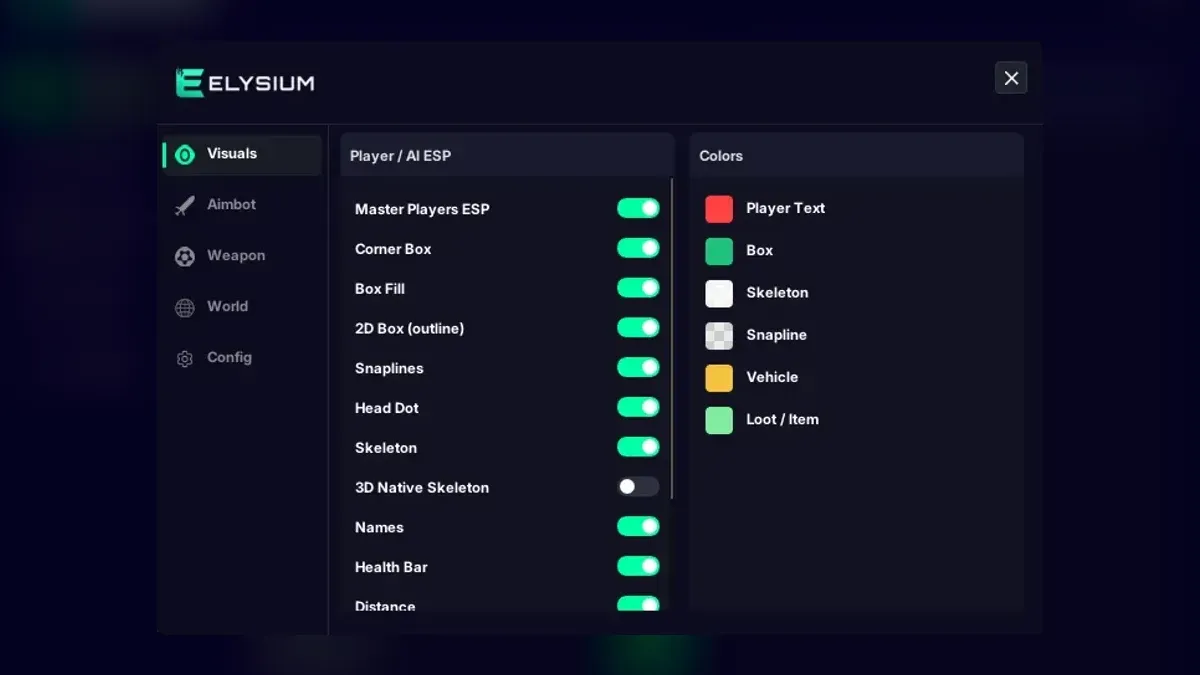
The first time you open the Visuals tab in Elysium RR, the temptation is to tick every box and see what happens. What happens is a screen so busy you cannot find the person shooting at you. Good Rob Run cheats are only as useful as the picture they leave you with, so this guide builds a Rob Run ESP layout one layer at a time, testing each layer before adding the next. It takes a few short sessions, and the result is a layout you can actually read in a busy street.
Before you start
Set Rob Run to Borderless or Windowed, load into a session, open the menu with Insert, and switch on Master Players ESP with nothing else enabled. That gives you a blank canvas. Work somewhere with a few players around, ideally a spot where people pass at different distances, because a layout that looks fine on one nearby player can turn into clutter when ten of them are on screen.
Layer one: a single shape
Pick exactly one way to draw each player. Your options are Corner Box, 2D Box (the full outline), Box Fill, Skeleton and Head Dot.
- Corner Box marks the edges of a player without drawing a full frame, so it hides less of the scene behind it.
- 2D Box is easier to spot at a glance but covers more of the screen.
- Skeleton shows posture, which helps when someone is half behind a car or crouched behind a counter.
- Head Dot is the lightest option and pairs well with one of the others.
A common starting point is Corner Box plus Head Dot. Leave Box Fill off for now; it is useful later, but it darkens everything behind it. Turn on Auto Resize so shapes scale with distance instead of staying the same size whether a player is next to you or across the map. Play a few minutes like this before going on.
Layer two: who they are
Now add identity. Names and Clan Tags tell you whether a group is one crew or several. Roles matters a lot in Rob Run, because the difference between a cop and a robber decides whether a player is a threat to you right now. Weapon tells you what someone is carrying before they raise it.
Pick two of these to start, not all four. Text stacks up fast. Roles and Weapon are a strong pair for most people. If you play in a clan, Teammate Highlight is worth turning on at this stage too, so your own people stand out without needing to read a single label.
Layer three: what state they are in
This is where Rob Run cheats earn their keep in fights. The state options are:
- Health Bar and Armor Bar, or Horizontal Health if vertical bars crowd your boxes
- Sprinting Indicator and Crouching Indicator
- KO Status, so you can tell a downed player from a standing one
- Cargo Pill, a tag for players carrying cargo
- Hidden Player Detection
KO Status and a health bar are the two most players keep. The sprinting and crouching flags are handy but add more marks; try them for a session and drop them if you stop noticing them.
Layer four: direction
Snaplines connect every player to a point on your screen, and Look Lines show where players are facing. Both are powerful and both are noisy. If you use Snaplines, keep them thin and consider limiting how far they reach through your Max ESP Distance in the World tab. Look Lines are most useful in close quarters, where knowing whether someone is facing your doorway matters more than knowing where they stand.
One skeleton option needs a separate mention. 3D Native Skeleton wears a Risky tag in the menu. The regular Skeleton option shows posture without that label, so most people have no reason to switch to the native version.
Colors and icons
Once the content is settled, adjust Colors so the things you care about most use the strongest contrast. Many players keep enemies in a bright color and teammates muted. Icons on ESP adds small symbols to the layout, which become quicker to read than text once you know what each one means.
Stress-test the layout
Take the finished layout somewhere crowded and ask three questions:
- Can I find the nearest threat without reading any text?
- Can I still see the street, the doors and the cars behind the ESP?
- Does anything flicker or overlap so much that I ignore it?
If any answer is wrong, remove something. With any Rob Run hack, trimming almost always works better than adding. When the layout passes, save it in the Config tab and bind a hotkey to Master Players ESP so you can clear the screen instantly. The step-by-step setup article covers saving configs if you have not done it yet.
Keep it honest
An ESP-only setup is still a cheat, and Rob Run runs Easy Anti-Cheat, so a ban is always possible. Treat that as part of the decision before you build anything. For the full list of visual options, see the Elysium RR features, and if you want the same approach applied to see-through walls specifically, read what a Rob Run wallhack actually shows.
Related: Rob Run Wallhack Explained: What You See Through Walls · Rob Run Cash ESP Cheat: Loot, Containers, Cargo and Worth · Rob Run Cheat Download and Setup, From Checkout to Config
Get Rob Run cheats
The same ESP and aimbot features covered in this guide — instant key delivery and a setup guide in your account.
Get Rob Run cheats Rob Run cheat purchase link